

Download GreenRope – Free CRM, Business Management Tool, Secure Cloud Software
Overview of GreenRope
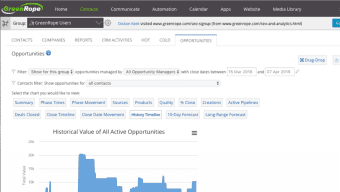
GreenRope is a cloud‑based, all‑in‑one business management suite that places customer relationship management (CRM) at its core while extending into project management, content creation, social media, and employee productivity tools. Designed with small to medium‑sized businesses in mind, the platform brings together a wide array of applications under a single, visually clean dashboard. From the moment you log in, you can navigate to a calendar, news feed, or detailed reports with just a click, and then dive deeper into modules such as lead scoring, automated marketing, or document storage.
While the interface offers a degree of visual customization, the real power lies in its ability to integrate seamlessly with popular email, calendar, analytics, and other business software—making data migration and workflow automation straightforward. GreenRope’s pricing plans are tiered by the number of contacts you can store, which keeps the cost predictable for growing businesses. Although the contact limits may become a constraint for large enterprises, the platform’s intuitive design and versatile feature set make it a compelling choice for firms looking to centralize their operations without juggling multiple disconnected tools.
Key Features that Set GreenRope Apart
- Unified CRM Dashboard: Centralizes contact management, lead scoring, and sales pipelines in an easy‑to‑navigate interface.
- Project Management Suite: Offers task tracking, Gantt charts, time logging, and resource allocation, all synced with CRM data.
- Automated Marketing Engine: Build drip campaigns, email newsletters, and social media posting schedules without leaving the platform.
- Content & Document Management: Store, version, and share files securely, with built‑in permission controls.
- Employee Productivity Tools: Includes internal chat, performance dashboards, and goal‑setting modules to keep teams aligned.
- Robust Integrations: Connects with Gmail, Outlook, Mailchimp, QuickBooks, Zapier, and many other SaaS products.
- Advanced Reporting & Analytics: Customizable reports on sales, marketing ROI, project health, and employee performance.
- Mobile‑Responsive Design: Access all functionalities from any device, with dedicated iOS and Android apps for on‑the‑go users.
- Security & Compliance: Data is encrypted at rest and in transit, and the platform complies with GDPR and CCPA regulations.
- Scalable Contact Limits: Tiered plans let you start with a few hundred contacts and scale up to tens of thousands as your business grows.
Each of these features is designed to reduce the need for multiple, siloed applications. For instance, when a sales rep updates a contact’s status in the CRM, the project management module automatically reflects any related tasks, ensuring that everyone from marketing to development stays on the same page. The automation engine also allows you to set triggers—such as sending a welcome email the moment a new lead is added—saving time and minimizing human error. Because GreenRope lives entirely in the cloud, updates are rolled out continuously, meaning you always have access to the latest tools without costly on‑premise upgrades. The combination of depth (rich functionality) and breadth (cross‑departmental reach) makes GreenRope a true “business operating system” for agile teams.
Installation, Setup, and Compatibility
Getting Started – A Step‑by‑Step Guide
Since GreenRope is a web‑based SaaS solution, there is no traditional installation process required on your local machine. Getting started involves three simple steps:
- Create Your Account: Visit the official GreenRope website, click “Start Free Trial,” and fill out the registration form with your business email. A verification link will be sent to confirm ownership.
- Configure Your Workspace: After logging in, the onboarding wizard walks you through setting up your company profile, adding users, and defining contact import preferences. You can import contacts from CSV files, or directly sync with Gmail, Outlook, or other CRMs via built‑in connectors.
- Tailor the Dashboard: Choose which modules appear on your home screen using the drag‑and‑drop widget system. While visual customization is limited to layout and color themes, you can prioritize the tools you use most frequently for quick access.
Operating System Support
GreenRope runs entirely in modern browsers, making it compatible with Windows 10/11, macOS Ventura and later, Linux distributions, as well as mobile platforms iOS 15+ and Android 10+. The platform is optimized for Chrome, Firefox, Safari, and Edge, ensuring a consistent experience across devices. Dedicated native apps for iOS and Android provide push notifications, offline access to recent records, and quick entry forms for field sales teams.
Best Practices for Secure Usage
Security is a top priority. Enable two‑factor authentication (2FA) for all user accounts, enforce strong password policies, and regularly review access permissions. GreenRope’s data centers are ISO‑27001 certified, and all data is encrypted using AES‑256 standards. For businesses handling sensitive information, consider the “Enterprise” plan, which offers additional controls such as IP whitelisting and single‑sign‑on (SSO) via SAML.
Conclusion: Pros, Cons, FAQs, and How to Get GreenRope Today
Pros & Cons
- Pros:
- All‑in‑one platform eliminates the need for multiple subscriptions.
- Intuitive, tab‑based dashboard reduces learning curve.
- Strong integration ecosystem with popular email, calendar, and accounting tools.
- Robust automation and reporting capabilities for data‑driven decisions.
- Scalable contact tiers make it adaptable for growing businesses.
- Mobile apps keep teams productive on the go.
- Cons:
- Contact limits on lower‑tier plans may restrict larger sales teams.
- Customization options are mostly cosmetic; deeper UI tweaks require developer support.
- Advanced features (e.g., SSO, custom API endpoints) are only available on higher‑price plans.
- Initial onboarding can feel overwhelming due to the breadth of modules.
Frequently Asked Questions
Is there a free version of GreenRope?
GreenRope offers a 14‑day free trial with full access to all features. After the trial, you must choose a paid plan; there is no permanently free tier.
Can I import existing contacts from another CRM?
Yes. GreenRope supports CSV imports and direct sync with popular CRMs such as HubSpot, Salesforce, and Zoho via built‑in connectors.
What level of data security does GreenRope provide?
All data is encrypted at rest and in transit using AES‑256. The platform complies with GDPR, CCPA, and is ISO‑27001 certified. Two‑factor authentication is optional for all users.
Can I customize the workflow automation?
Absolutely. The visual automation builder lets you set triggers, conditions, and actions across CRM, marketing, and project modules without writing code.
Is there a mobile app for field teams?
Yes. GreenRope offers native iOS and Android apps that provide offline access, push notifications, and quick entry forms for leads and tasks.
Final Verdict & Call to Action
GreenRope stands out as a comprehensive, cloud‑first solution that consolidates CRM, project management, marketing automation, and employee productivity into a single, secure environment. Its strengths lie in the breadth of integrated tools, ease of use, and the ability to scale as your contact list grows. While larger enterprises may outgrow the contact caps on lower‑tier plans, small and medium businesses will find the platform delivers excellent value for the price. If you’re ready to replace fragmented software stacks with a unified system that drives efficiency and insight, click the button below to start your free trial and experience GreenRope firsthand.
Start Your Free Trial of GreenRopeGreenRope delivers an impressive suite of tools that truly centralize business operations. The UI is clean, the automation builder is powerful, and the integration options are extensive. The only drawback is the contact limit on entry‑level plans, but for most SMBs this is a minor inconvenience compared to the overall productivity boost.



.png)



